


Soutine
New users receive 8 free credits after signing up.

FLUX 3 Image Klein: AI image generator & editor

Create with FLUX 3 Image Klein: turn a prompt into a new image, or give an existing image a different color, setting, or style. Start below with text or your own references.

Text to Image
Generation mode: Text to Image. 17 available models.

Start from an idea

FLUX 3 Image Klein at a glance

Developer
Black Forest Labs
Modes
Text-to-image and image editing
Reference images
Up to 10 per edit
Aspect ratios
1:1 · 4:3 · 3:4 · 16:9 · 9:16
Output
PNG, up to 4096 px
Credits per image
  • 1K4 creditsExplore compositions and compare directions.
  • 2K6 creditsWebsite imagery, social posts, and presentations.
  • 4K16 creditsA larger final visual once the composition is settled.

Standard rates. The generator confirms the exact credits before you submit, and the same rates apply to text-to-image and image editing. View pricing →

Image editing, one clear change at a time

Use FLUX 3 Klein as an online image editor: say what to change and what to keep. Start with a focused edit, inspect the result, then build on the version you prefer.

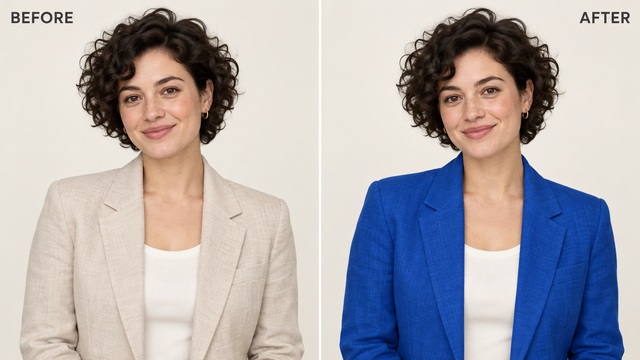
Before and after: a woman’s beige blazer recolored to cobalt blue, with the same pose, hair, and background

A new color for the same look

Change a jacket’s color while asking to preserve the pose, fabric texture, and background. Review the result before making your next adjustment.

Prompt

Change the blazer to cobalt blue. Keep the face, pose, fabric texture, and background unchanged.

1K · 4 credits
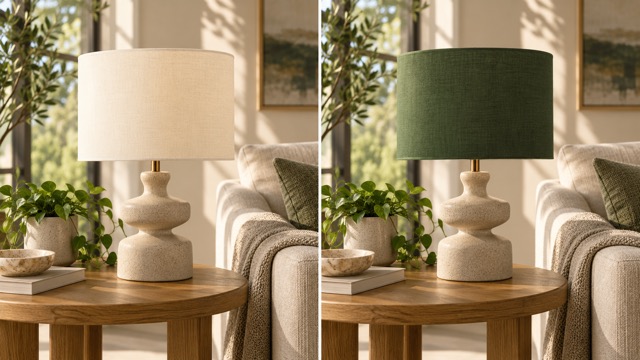
Before and after: a cream lampshade changed to deep green in the same living room

Rethink a room one detail at a time

Try a different lampshade color without asking for a whole new interior. Describe the lighting and furniture you want to retain.

Prompt

Change the lampshade to a deep green fabric. Keep the lamp base, table, sofa, and warm lighting as they are.

1K · 4 credits
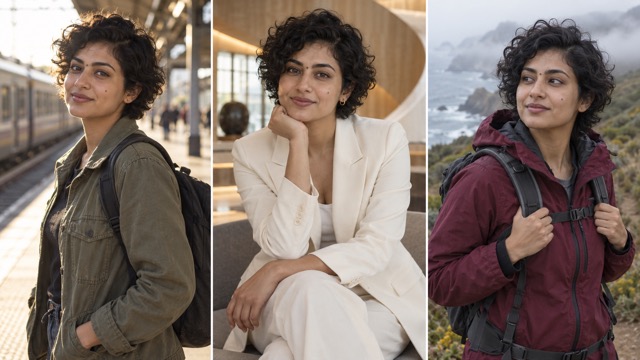
The same woman with short curly hair in three settings: a train platform, a hotel lounge in a white suit, and a coastal hiking trail

Give each reference image a role

Reference images work best when each one contributes different information. Upload a clear photo of the subject, then add images for the setting and the light, and explain those roles in upload order. You can use up to 10 references; if two of them disagree on color, pose, or background, say which one should take priority.

Subject
Who or what must stay recognizable
Setting
Where the new scene takes place
Light
The mood, time of day, or visual style

An AI image generator is easier to direct when the intended use is clear. Choose a direction, then describe the subject and the details your image needs to communicate.

A new setting for the same product

Upload a product photo and describe the new surface, props, and light. Ask to keep the bottle shape, cap, and color.

From sketch to photograph

Start from a drawing and name the materials and setting it should become. State the shapes that must not change.

World building

Define a focal point and a sense of scale, then describe the foreground, middle distance, and background under one light source.

Type and object studies

Keep the object list short, set a restrained palette, and say where empty space and lettering should go. Check generated text carefully.

How to use FLUX 3 Image Klein online

  1. Describe your image

    Write a prompt, or upload images and describe what should change. Include the subject, composition, lighting, and details that matter.

  2. Choose the frame and resolution

    Pick an aspect ratio and 1K, 2K, or 4K. Use 1K to explore a direction and higher resolutions when you need a larger output.

  3. Generate, review, and download

    Check the credit quote before generating. Review the full image, refine your prompt if needed, and download your result.

Write for the image you want to finish with

For text-to-image generation, build the prompt in this order. For an edit, describe the finished scene as well as the change, and separate essential details from optional styling. When a result misses, adjust one instruction at a time so you can see what changed.

  1. Subject & action
  2. Setting
  3. Framing
  4. Light
  5. Materials
Too vagueMake it better
ClearThe same portrait with a cobalt blue blazer; keep the face, pose, and background

Frequently asked questions about FLUX 3 Image Klein

Start your next image with a clear idea

Choose your model, describe the result, and review the credit quote. Your prompt stays in place when you switch models.

Start creating